







⚡ Executive Briefing for Technical Leaders (Key Takeaways)
- The Corporate Data Dilemma: Transmitting proprietary code, internal financials, PII, or patient records to third-party public cloud APIs exposes organizations to regulatory penalties (GDPR Art. 28/32, HIPAA) and unpredictable per-token billing cycles.
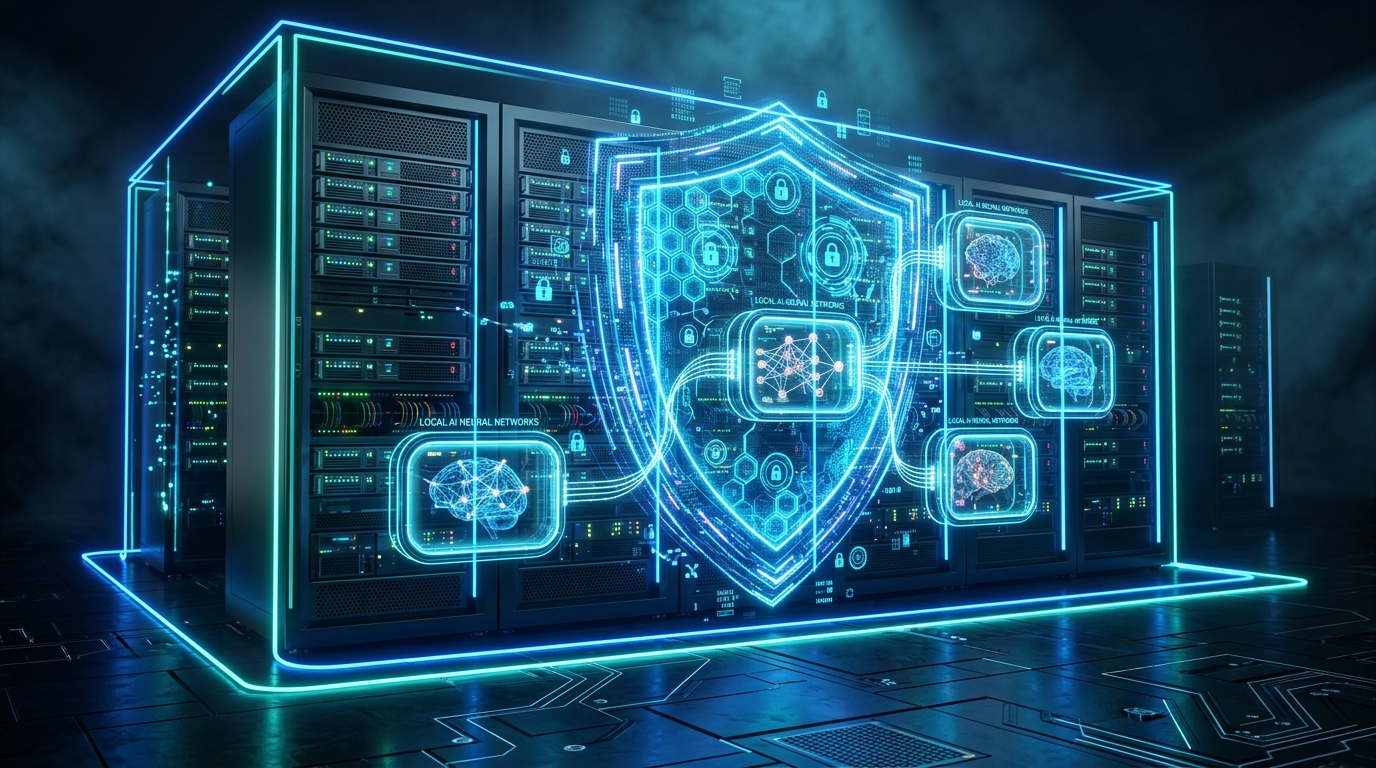
- The On-Premise Solution: Deploying state-of-the-art open models like Llama 3.1 (8B/70B) and DeepSeek-R1 (Distill 8B/14B) via Ollama and Docker guarantees strict zero data egress, full intellectual property sovereignty, and fixed, amortizable hardware costs.
- Proven Hardware Sizing: With
Q4_K_MGGUF quantization, an 8B parameter model requires only ~5.5 GB of VRAM, operating at >45 tokens/second on accessible consumer-grade hardware (NVIDIA RTX 3060/4060 or Apple Silicon) with negligible precision loss.
In the enterprise race to operationalize generative AI, engineering leaders encounter a non-negotiable barrier when transitioning from proof-of-concept to production: data governance and perimeter security. Streaming confidential customer agreements, financial spreadsheets, or proprietary algorithms through public cloud APIs creates compliance vulnerabilities and escalating operational expenditure (OpEx). Today, high-performance open-weight models paired with containerized local inference engines make on-premise AI deployments robust, highly secure, and cost-effective.
1. The Enterprise Crossroads: Public Cloud API vs. Self-Hosted Stack
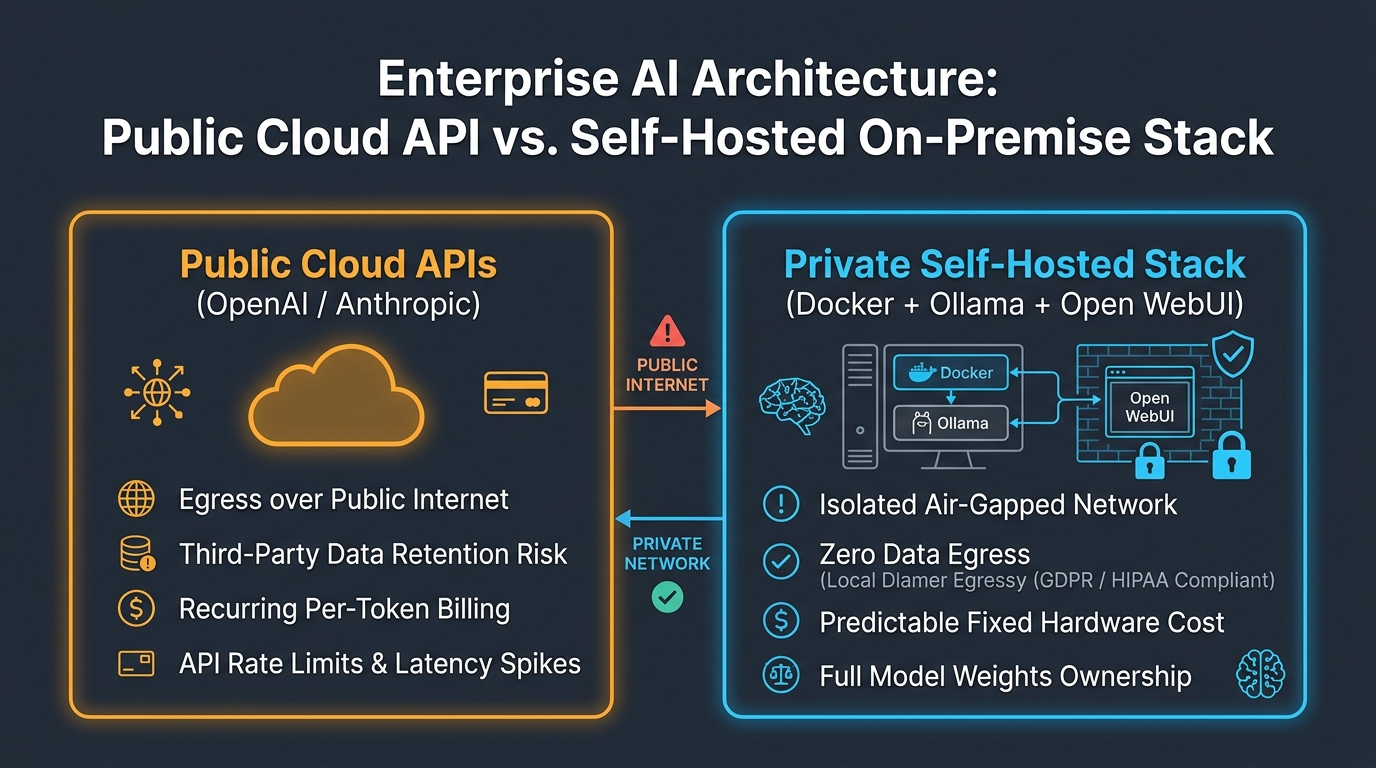
For the past two years, the default enterprise on-ramp was consuming hosted commercial APIs. However, in strictly regulated environments, security architects have documented three major operational friction points:
- Data Retention and Egress Vulnerabilities: Standard commercial cloud terms of service may store prompt and response logs for up to 30 days for abuse monitoring unless expensive, customized enterprise agreements (such as HIPAA BAAs) are negotiated.
- Uncontrolled Latency and Outage Cascades: Mission-critical internal pipelines cannot tolerate API rate-limiting throttling (HTTP 429), transit jitter, or third-party cloud outages.
- Linear Cost Scaling: As automated document processing, internal coding assistants, and customer service agents process millions of tokens daily, per-token billing scales indefinitely, whereas dedicated hardware is amortized as predictable capital expenditure (CapEx).
| Architecture Dimension | Public Cloud APIs (OpenAI / Anthropic) | Self-Hosted Stack (Docker + Ollama) |
|---|---|---|
| Data Privacy & Governance | Data traverses the public Internet to third-party data centers. | 100% On-Premise / Isolated internal subnet (Zero Egress). |
| Cost Structure | Variable, recurring per-token monthly operational expenditure. | Predictable, fixed CapEx hardware amortization ($0/token). |
| Network Independence | Requires continuous Internet connectivity; subject to API rate limits. | Full offline capability / operates in air-gapped environments. |
| Regulatory Compliance | Demands cross-border data transfer assessments and DPAs. | Native compliance with GDPR (Art. 32), HIPAA, and SOC 2. |
2. Hardware Sizing: How Much VRAM Do You Actually Need?
A persistent misconception in executive decision-making is that running modern enterprise language models requires multi-million dollar GPU clusters. Modern 4-bit GGUF quantization (specifically Q4_K_M) has fundamentally revolutionized resource efficiency.
Mathematically, the total Video RAM (VRAM) required to hold model weights alongside the Key-Value (KV) attention cache is calculated via:
Total VRAM Required ≈ (Parameters × Quantized Bits / 8) + Context Buffer (KV Cache)
For a production standard 8,192-token context window with Grouped Query Attention (GQA):
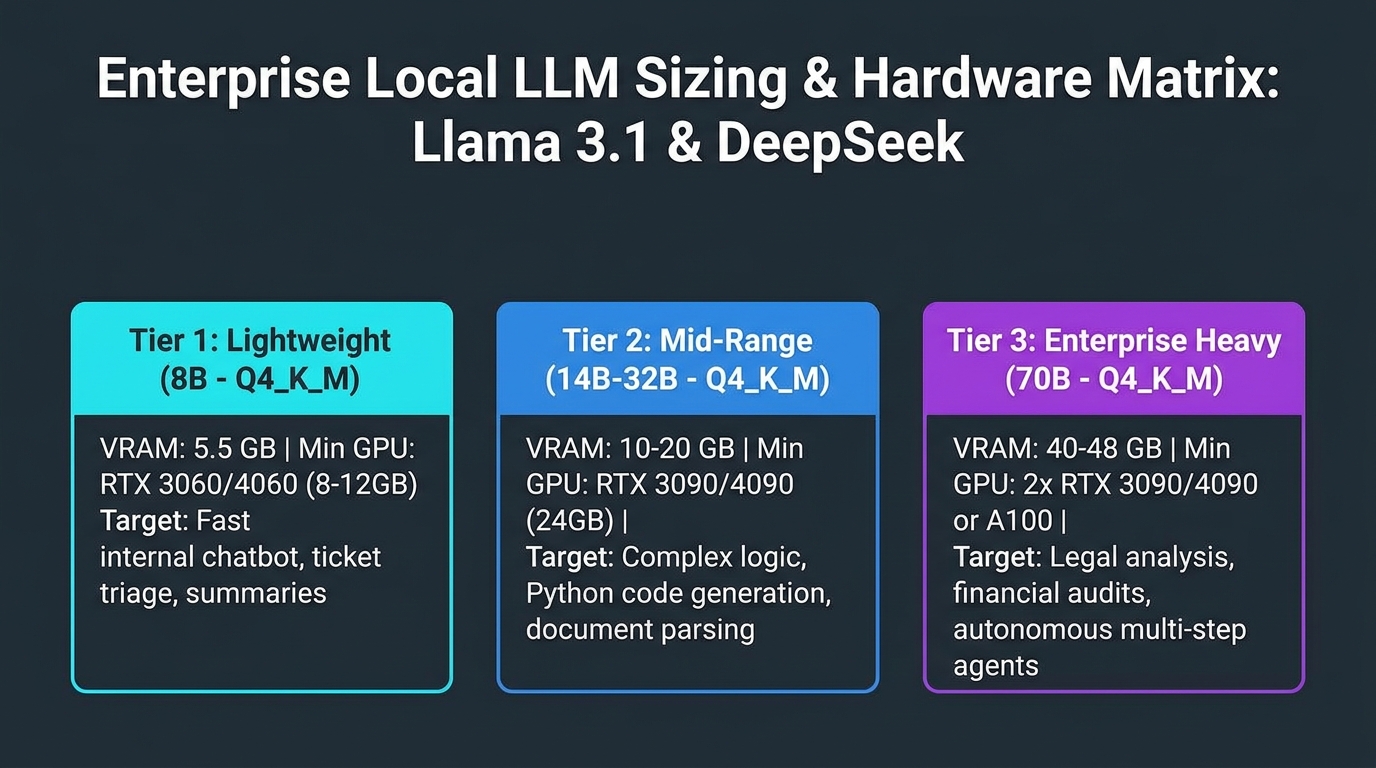
- 8-Billion Parameter Tier (Llama 3.1 8B / DeepSeek-R1-Distill-8B): Weighs ~4.9 GB in 4-bit weights. Adding KV cache overhead results in a footprint of 5.5 to 6.5 GB VRAM. It runs effortlessly on entry-level enterprise GPUs like the NVIDIA RTX 3060 (12 GB) or RTX 4060 Ti (16 GB), generating 40–55 tokens per second.
- 14 to 32-Billion Parameter Tier (DeepSeek-R1-Distill-Qwen-14B / 32B): Represents the ultimate sweet spot for advanced logical reasoning, mathematics, and Python code generation. Requiring between 10 and 20 GB VRAM, it operates on a single workstation GPU like the NVIDIA GeForce RTX 3090 / 4090 (24 GB) or Apple Silicon workstations with 32 GB unified memory.
- 70-Billion Parameter Tier (Llama 3.1 70B): The gold standard for multi-turn autonomous agents, deep regulatory auditing, and complex synthesis. Requiring ~40 GB VRAM under
Q4_K_M, it runs across dual 24 GB GPUs (Dual RTX 3090/4090 with PCIe tensor parallelism) or dedicated data center accelerators (NVIDIA RTX 6000 Ada / A100).
3. Production-Ready Deployment with Docker Compose
To achieve an air-gapped, isolated deployment with native hardware GPU acceleration, we orchestrate Ollama as the headless inference server and Open WebUI as the authenticated enterprise portal.
Create a production docker-compose.yml file:
version: '3.8'

services:
  ollama-engine:
    image: ollama/ollama:latest
    container_name: 4ruy-ollama-core
    restart: always
    environment:
      - OLLAMA_KEEP_ALIVE=24h      # Prevents model unloading between requests
      - OLLAMA_NUM_PARALLEL=4      # Concurrently processes up to 4 parallel prompts
      - OLLAMA_FLASH_ATTENTION=1   # Hardware-level attention acceleration
    volumes:
      - ./ollama_storage:/root/.ollama
    deploy:
      resources:
        reservations:
          devices:
            - driver: nvidia
              count: all
              capabilities: [gpu]
    networks:
      - internal-ai-network

  open-webui:
    image: ghcr.io/open-webui/open-webui:main
    container_name: 4ruy-ai-interface
    restart: always
    ports:
      - "127.0.0.1:8080:8080"      # Bound strictly to loopback behind a reverse proxy
    environment:
      - OLLAMA_BASE_URL=http://ollama-engine:11434
      - WEBUI_AUTH=true            # Enforces local enterprise authentication
      - ENABLE_SIGNUP=false        # Restricts account provisioning to administrators
    volumes:
      - ./webui_storage:/app/backend/data
    depends_on:
      - ollama-engine
    networks:
      - internal-ai-network

networks:
  internal-ai-network:
    driver: bridge
Launch the stack in detached mode:
docker compose up -d
Pull the verified high-performance quantized weights directly inside the container:
# Fast general-purpose and classification model
docker exec -it 4ruy-ollama-core ollama pull llama3.1:8b

# Deep reasoning and code intelligence model
docker exec -it 4ruy-ollama-core ollama pull deepseek-r1:14b
4. Drop-In Python Integration (OpenAI SDK Compatible)
Ollama natively exposes an API surface identical to the OpenAI REST specification at http://localhost:11434/v1. Engineering teams can swap endpoint routes without refactoring production application logic:
from openai import OpenAI

# Direct zero-egress local connection to the on-premise Ollama instance
client = OpenAI(
    base_url="http://localhost:11434/v1",
    api_key="ollama" # Required by the client SDK but ignored by the local daemon
)

response = client.chat.completions.create(
    model="deepseek-r1:14b",
    messages=[
        {
            "role": "system",
            "content": "You are a 4Ruy corporate financial auditing assistant. Maintain strict analytical rigor."
        },
        {
            "role": "user",
            "content": "Evaluate working capital liquidity risks from the attached financial statements under strict confidentiality."
        }
    ],
    temperature=0.2 # Deterministic low temperature for analytical precision
)

print("--- On-Premise Model Response ---")
print(response.choices[0].message.content)
5. Strategic FAQ: Local AI in Enterprise Environments
Can an 8B or 14B model truly match GPT-4o or Claude 3.5 Sonnet?
For unbounded trivia and general creative writing, massive multi-hundred-billion parameter models retain an edge. However, for domain-specific enterprise automation—structured JSON entity extraction, technical contract review, code refactoring, and document RAG over internal knowledge bases—specialized open models like DeepSeek-R1 (14B/32B) and Llama 3.1 (8B fine-tuned) deliver parity with closed models, eliminating data exfiltration risks and slashing recurring token costs to zero.
How is zero network egress physically guaranteed?
By defining an isolated Docker bridge network (internal-ai-network) without outbound gateway mappings and binding ingress ports strictly to the loopback interface (127.0.0.1), packets are physically prevented from routing to external WAN gateways. Even if a third-party dependency attempted external telemetry, host-level firewall rules and container network isolation drop the traffic immediately.
📚 Verified References and Technical Citations:
- Meta AI (2024). The Llama 3 Herd of Models: Architecture, Training and Capabilities — Official Meta AI Research Technical Report.
- DeepSeek-AI (2025). DeepSeek-R1: Incentivizing Reasoning Capability in LLMs via Reinforcement Learning — Official Scientific Paper on arXiv:2501.12948.
- Gerganov, G. et al. (2023–2025). llama.cpp: High-Performance Inference of GGUF Models — GitHub Official Repository & Quantization Architecture.
- Ollama Core Documentation (2025) — Containerized Inference, Hardware Acceleration & REST API Surface.
- European Union General Data Protection Regulation (GDPR) — Articles 28 & 32 on Security of Processing and Data Perimeter.